| 哆啦A夢中文網/哆啦A夢新聞台 |

Located in Shibuya, ‘Doraemon F’s Kitchen’ is a limited time cafe that Fujiko Fujio fans must not miss when they travel to Tokyo! In this article, we will guide you through the restaurant’s reservation system through step by step instructions, allowing you to secure your reservation in advance!
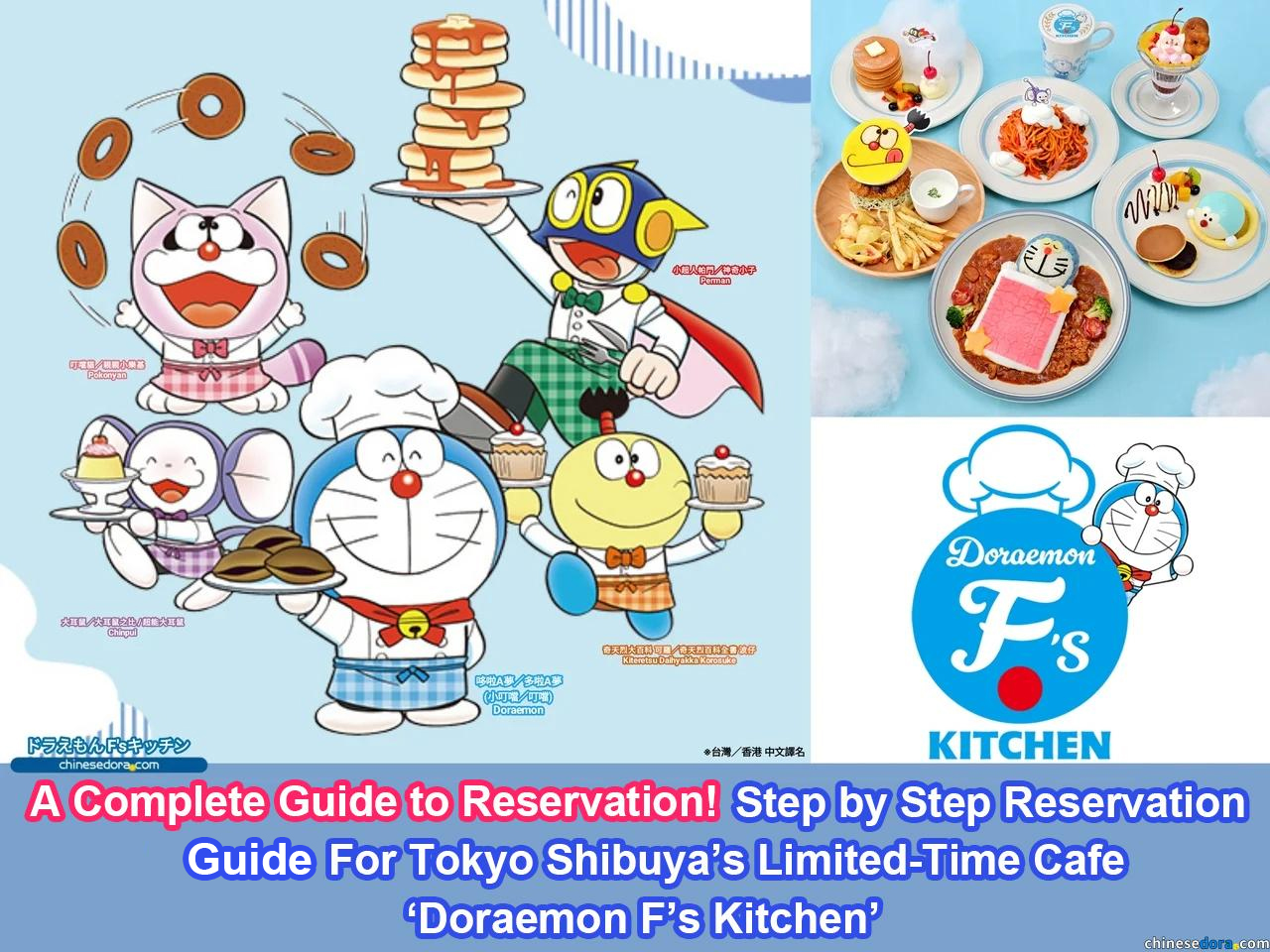 (Created by chinesedora.com)
Located in Tokyo Shibuya’s Miyashita Park and expected to be open for fans until January 2026, ‘Doraemon F’s Kitchen’ is a cafe themed after famous Japan manga author Fujiko Fujio’s renowned series Doraemon as well as other characters within his F world view. The cafe currently sells multiple specialised dishes, including deserts, drinks as well as limited themed merchandises!
 (dora-fskitchen.com)
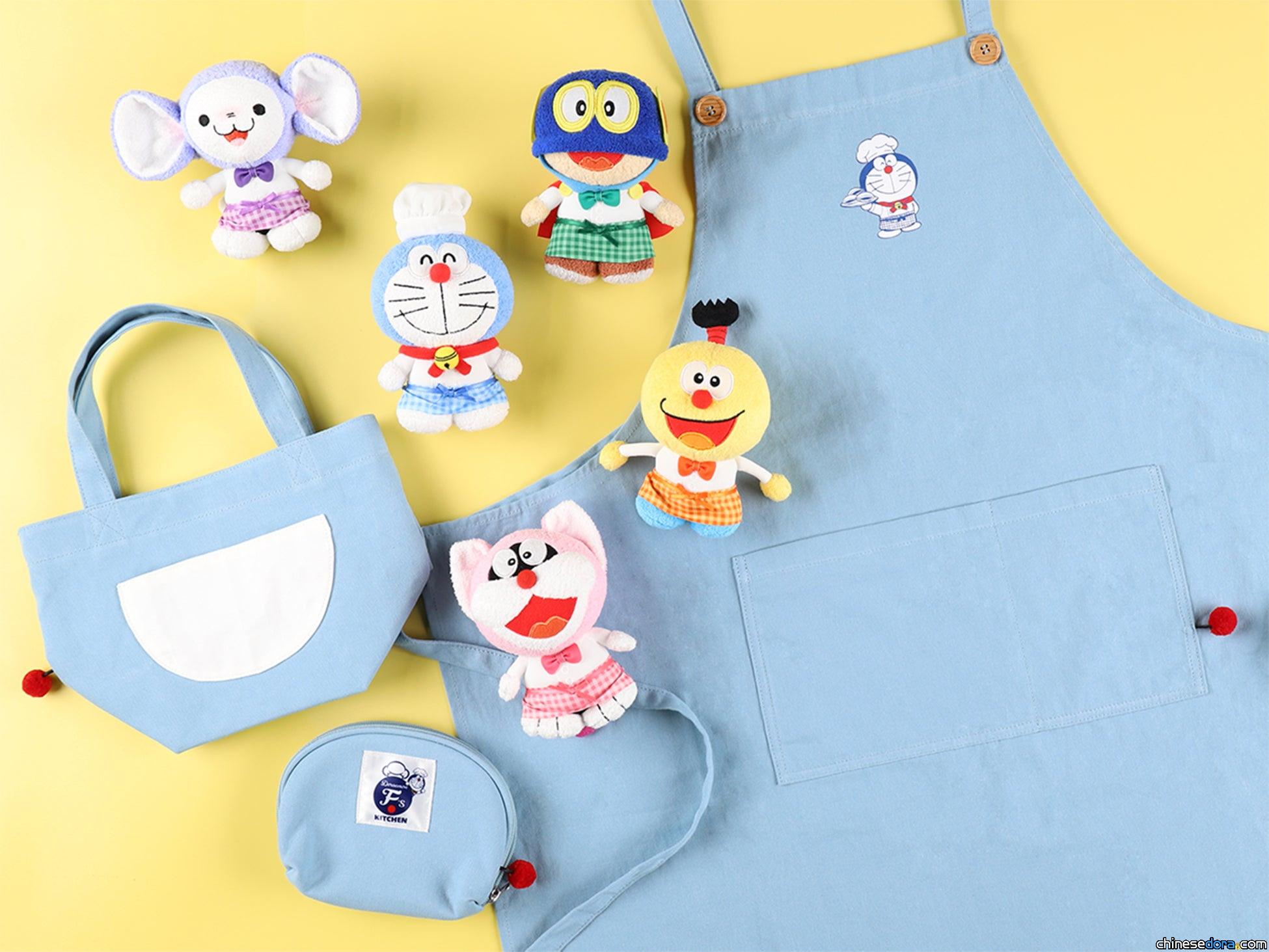 (dora-fskitchen.com)
Since it’s opening in December 2024, ‘Doraemon F’s Kitchen’ has been a great hit amongst it’s fans, with the cafe requiring an advance reservations unlike other ‘Doraemon’ or Fujiko related attractions in Japan. Additionally, the reservation system is currently only available in Japanese.
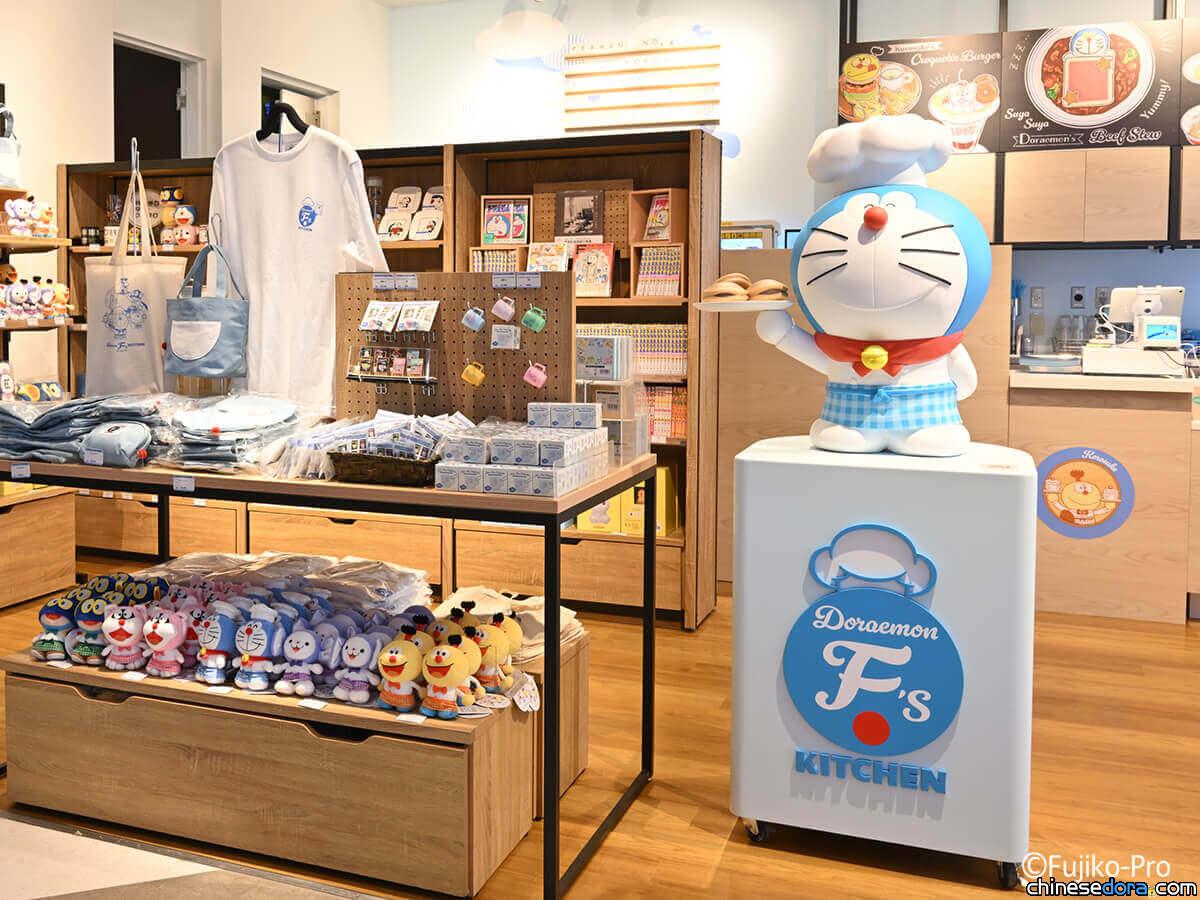 (dora-fskitchen.com)
In light of this, to assist fans outside Japan that would like to visit, we’ve created a step by step reservation guide with clear instructions and images to assist, with our aim to helps fans around the around who would like to reserve in order to have a smoother experience when undergoing the registration and reservation process. Now let’s have a look at our step to step guide to the reservation process!
Step 1 – Visit the Official Cafe Website and the Reservation Homepage
‘Doraemon F’s Kitchen’ opens reservations for the following month opens on the 16th of every month at 12pm JST. Fans planning to visit should make sure they remember to complete their reservation in advance as your desired time could be fully booked very quickly. During the reservation process, you would be able to choose your preferred visiting date and time.
To access the reservation page, first visit the the official website of Doraemon F’s Kitchen at “https://dora-fskitchen.com” . Then, click on the “Dorayaki” icon at the bottom right corner of the homepage, which would then automatically redirect to the “Store Information” page (ご入店についてのご案内).
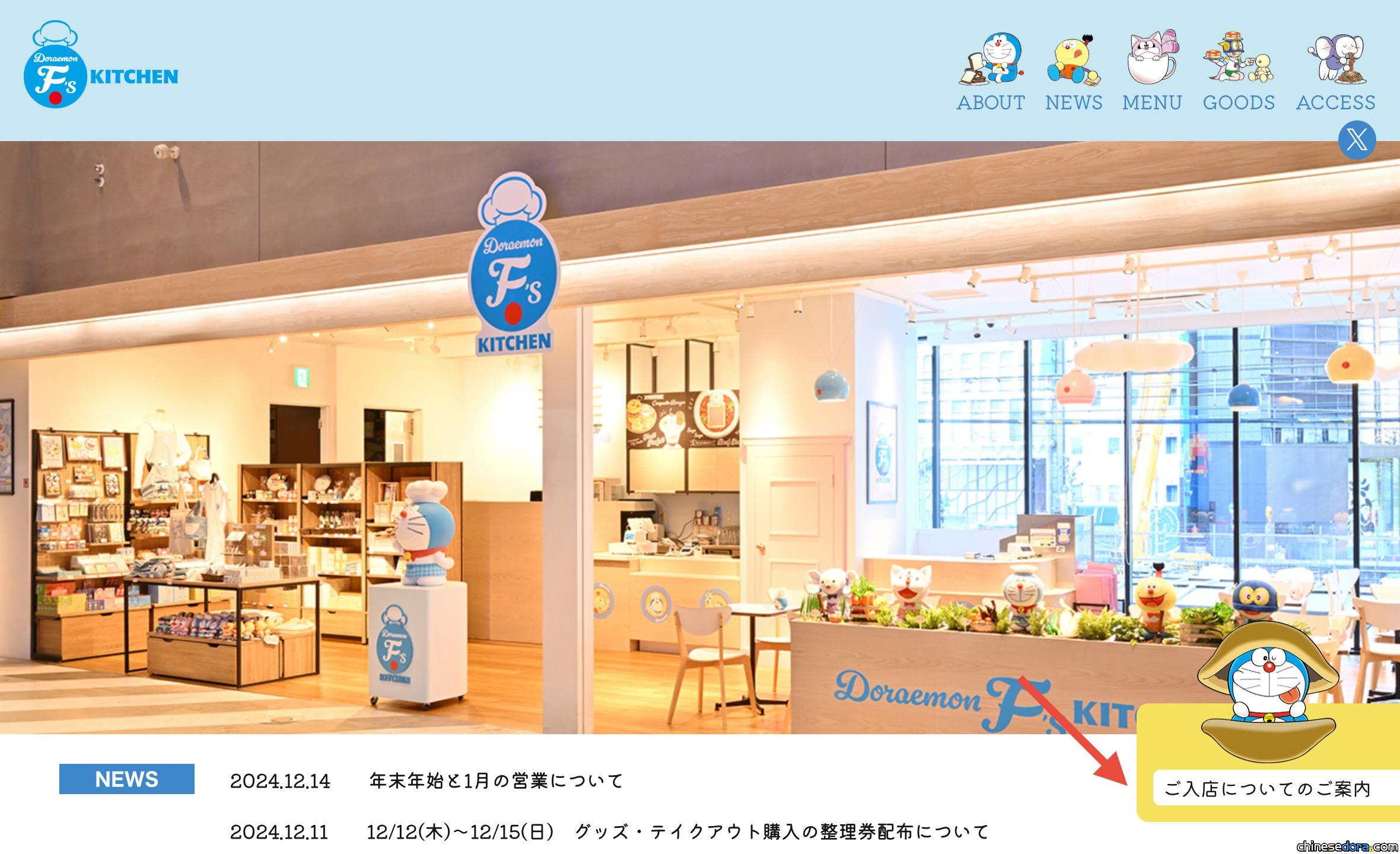 “Doraemon F’s Kitchen” homepage, with the “Visitor Information” button located at the bottom right.(dora-fskitchen.com)
On the “Visitor Information” page of Doraemon F’s Kitchen, click the blue button in the middle labeled “Reservation System”(予約システムはこちら) to jump to the reservation page.
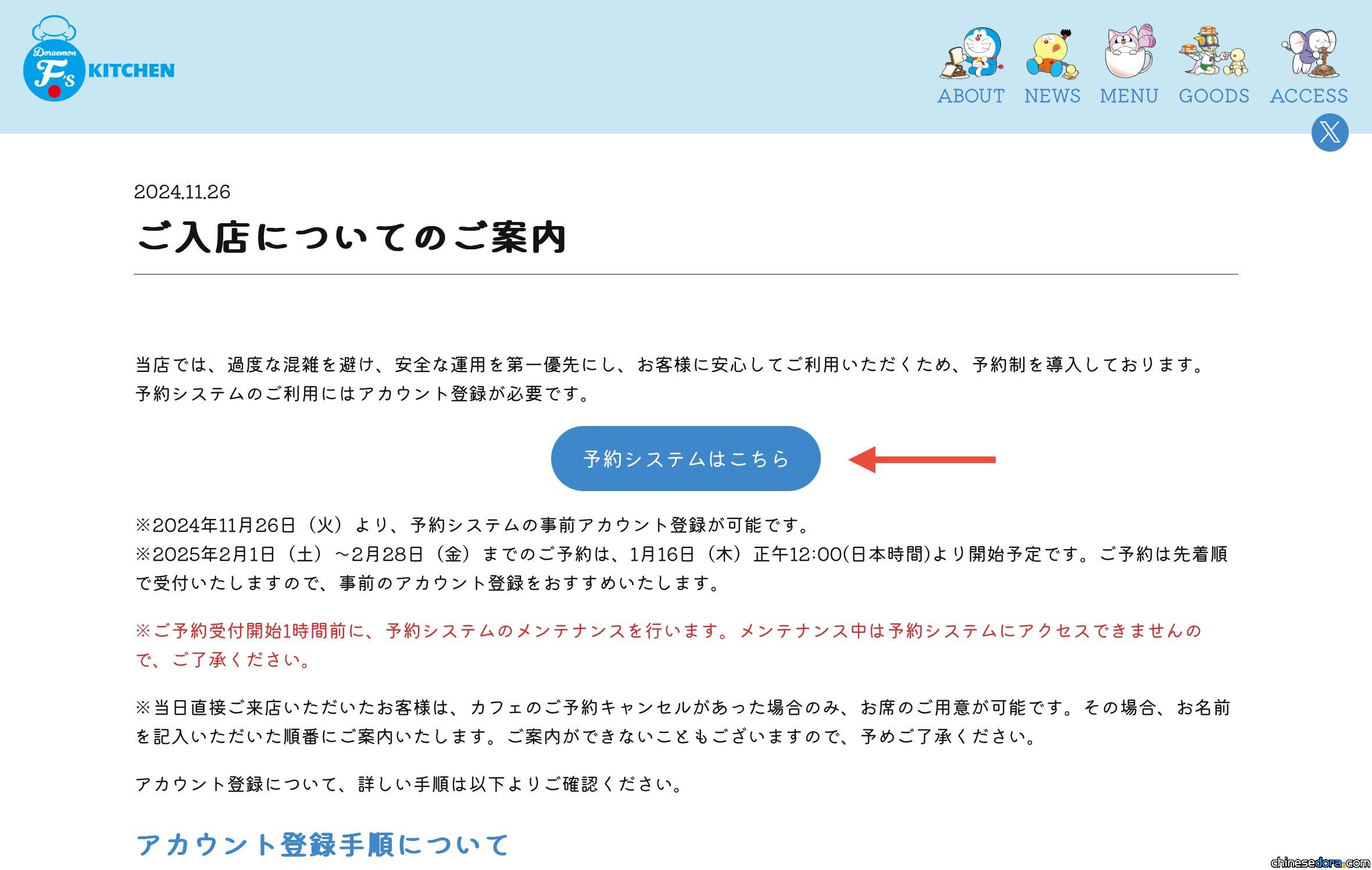 “Visitor Information” page of “Doraemon F’s Kitchen,” with the blue button leading to the “Reservation System.”(dora-fskitchen.com)
Step 2 – Register a Reservation Account
To make a reservation, you must first create an account on the reservation website, which will also allow customers to modify or cancel bookings after.
After entering the reservation system, the login screen will appear. If this is your first time accessing the reservation system, simply click the link below the login button (ログイン)that says “Don’t have an account?”(アカウントをお持ちでない方) to proceed to the new account registration page(アカウント新規登録画面).
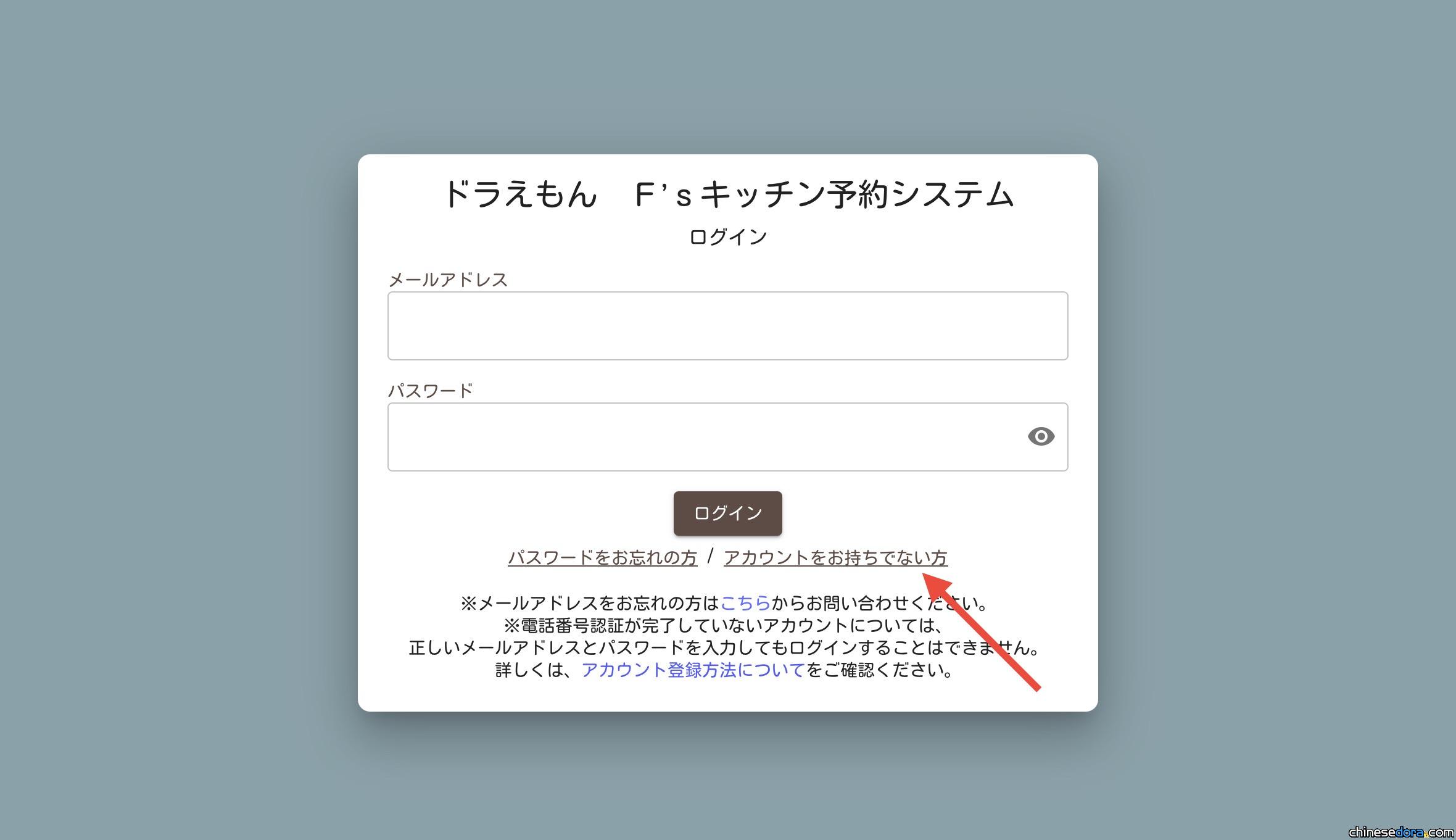 Login page of the “Doraemon F’s Kitchen” reservation system.(dora-fskitchen.com)
On the registration page, you’ll need to provide:
.Name (Surname, Given (First) name)
.Phone number
.Email address
Important notes:
.Names must be entered in Roman letters(half-width uppercase alphabets ローマ字・半角大文字).
.Phone numbers support international numbers. Click the flag icon to select your country/region code(e.g., Japan +81, Hong Kong +852, Taiwan +886).
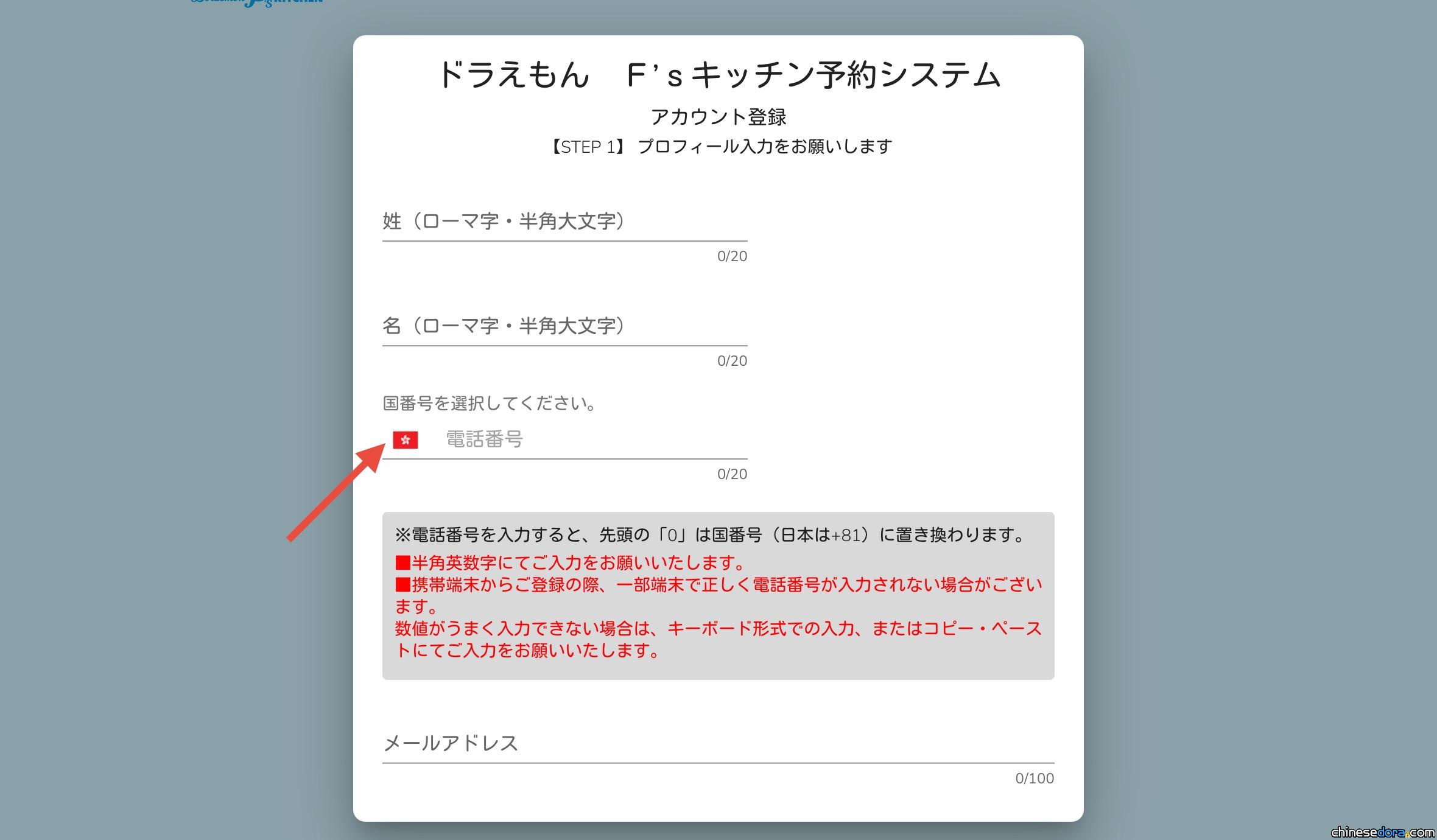 Account registration page of the “Doraemon F’s Kitchen” reservation system, where users must fill in “Surname,” “Given (First) Name,” “Phone Number,” and “Email Address” (initial entry and confirmation).
Once the personal details are filled in, click “Confirm Input”(入力内容を確認) to review the information, then proceed to the Privacy Policy Agreement page(プライバシーポリシーへの同意). After agreeing, the screen will then display a screen showing “Account Registration Completed.”(アカウント仮登録完了)
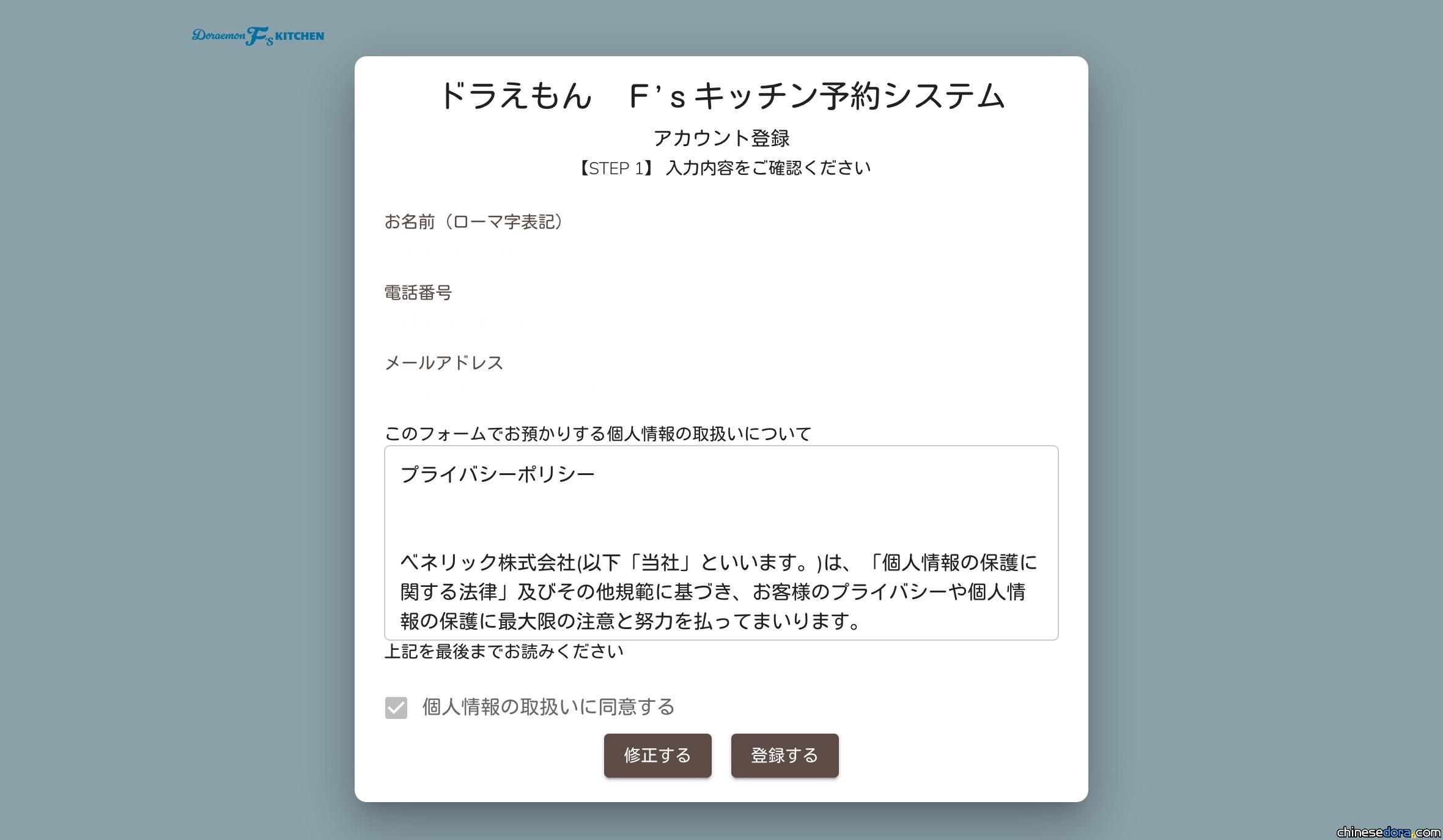 Confirmation window of the account registration page in the “Doraemon F’s Kitchen” reservation system. Use the left button to edit details or the right button to confirm registration.(dora-fskitchen.com)
Step 3 – Email and Phone Verification
After submitting your details, the system will redirect you to the email verification step. The screen will also display the email address you registered with.
In order to complete the email verification, check your inbox of the email you have registered for a verification email from “[email protected]”.Click the verification link in the email to proceed to the phone verification page.
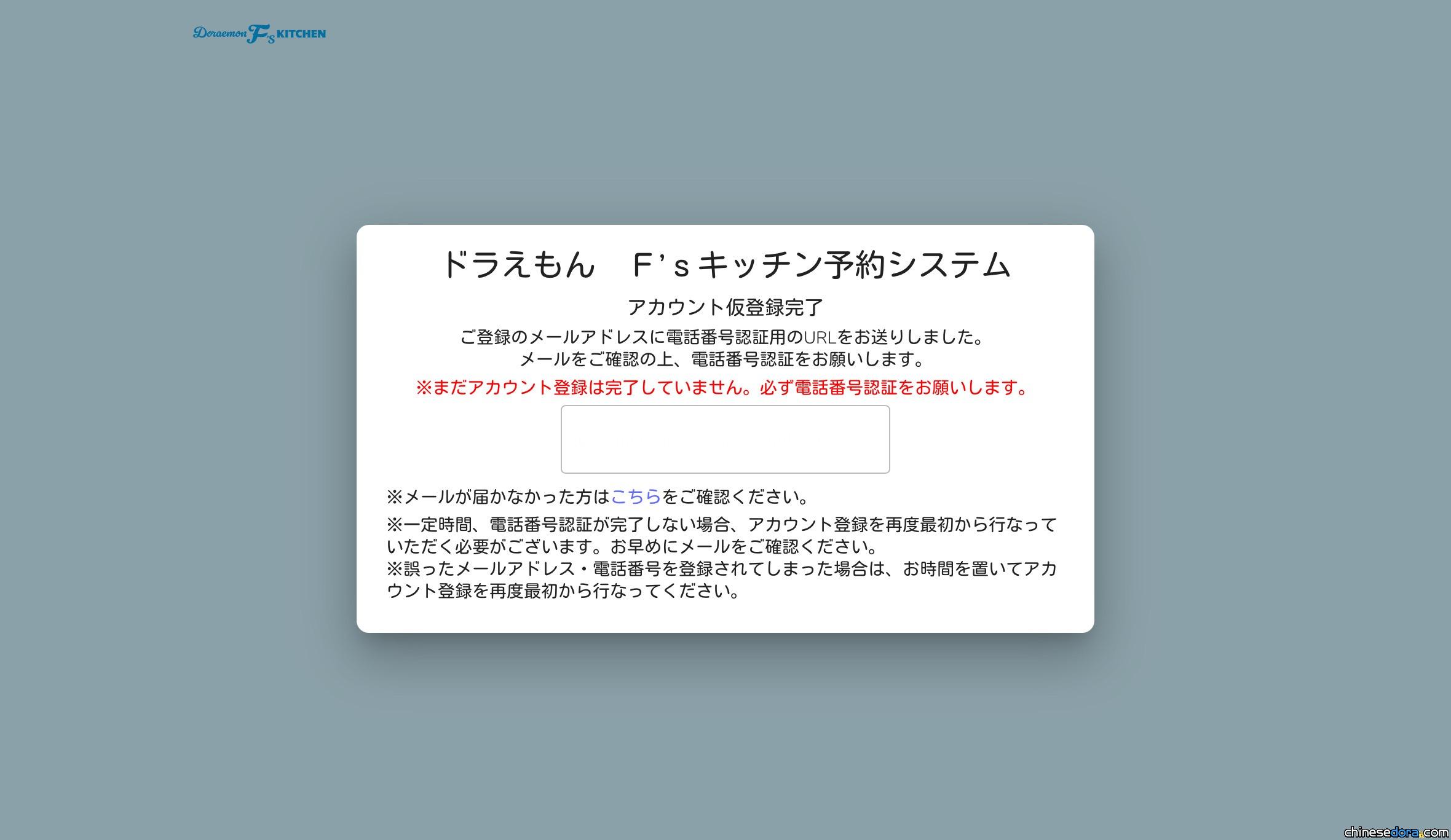 Email verification page of the “Doraemon F’s Kitchen” reservation system, where users must check the email address displayed in the white box and click the verification link to proceed.(dora-fskitchen.com)
On the phone verification screen, a phone number will be shown in the blue box. You must call this number using the same phone number you registered with.
Note:
.The verification number is a Japanese domestic number. If calling from overseas, add the +81 (Japan country code) before the number.
.Your carrier may incur additional international calling fees, so it’s always a good idea to check in advance to see if you may be charged an additional cost.
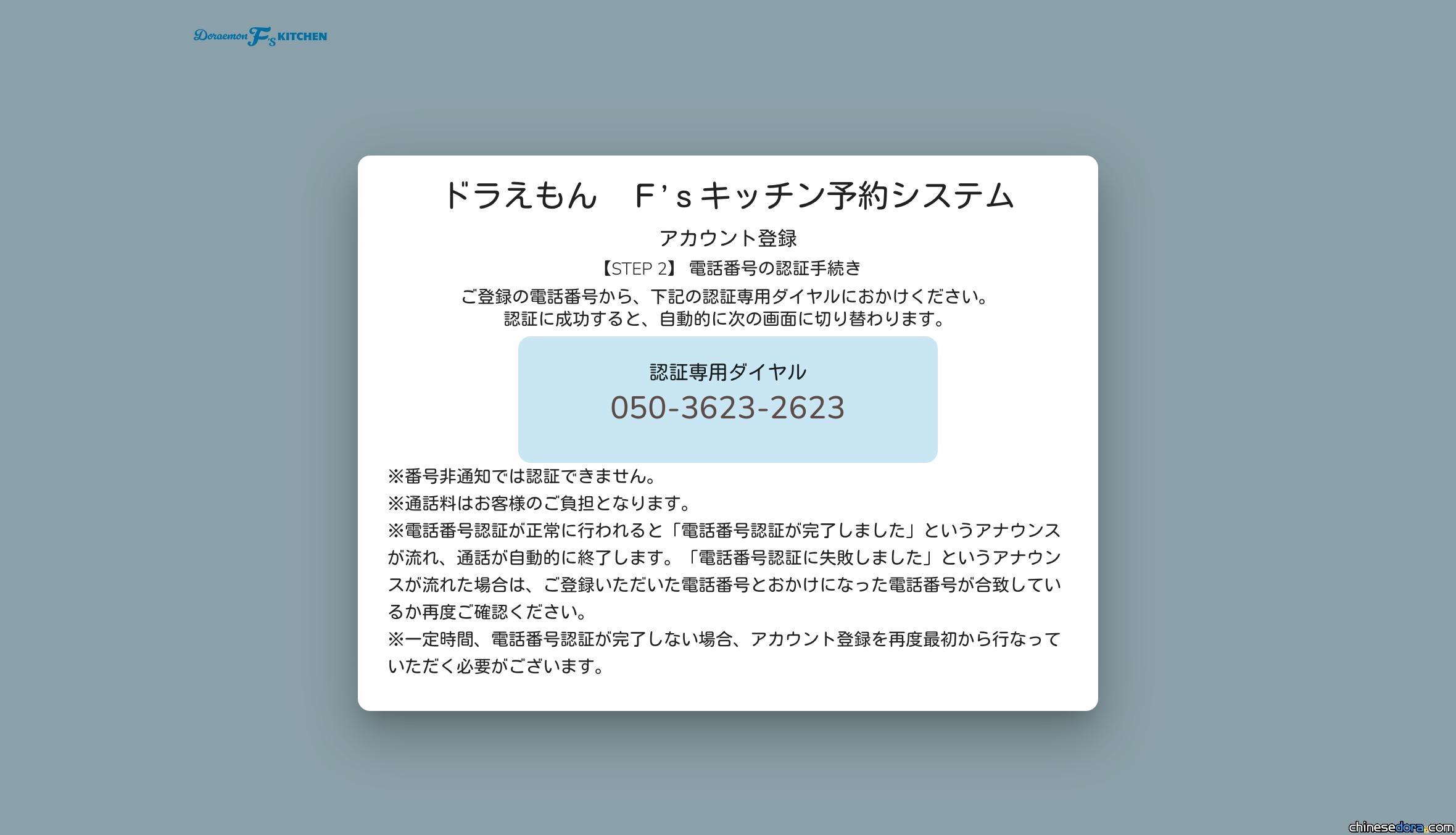 Phone verification page of the “Doraemon F’s Kitchen” reservation system. After completing email verification, users must call the Japanese phone number displayed in the blue box using the registered phone number to finalize verification.(dora-fskitchen.com)
Once the phone verification is completed, you’ll be prompted to set a password, which finalises your registration. After this process, you can then begin to use the reservation system.
 Password setup page of the “Doraemon F’s Kitchen” reservation system. After completing account verification, users create a new password (enter and confirm).(dora-fskitchen.com)
Step 4 – Choose Number of Guests and Time Slot
After being redirected back to the login in page, simply log in with your newly registered account, and you’ll see the reservation information page. The page will show information including “available booking dates”, “business hours”, and time limits. Scroll down to the bottom and click “Next Page” to proceed.
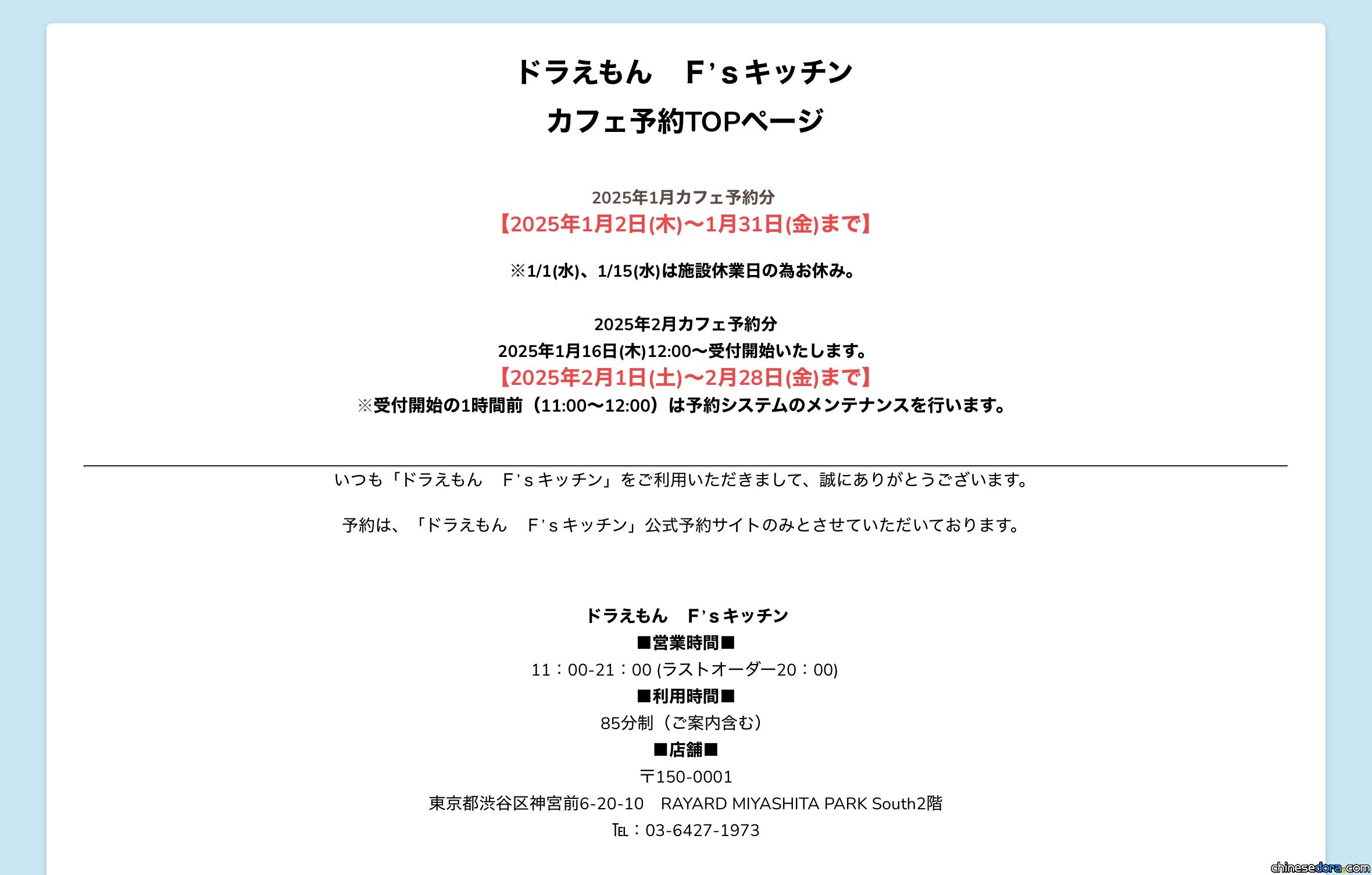 Top section of the “Doraemon F’s Kitchen” reservation webpage, displaying available booking dates, business hours, and dining time limits.(dora-fskitchen.com)
On the reservation page, Select the number of guests, where then a list of available reservation dates and time slots will appear.
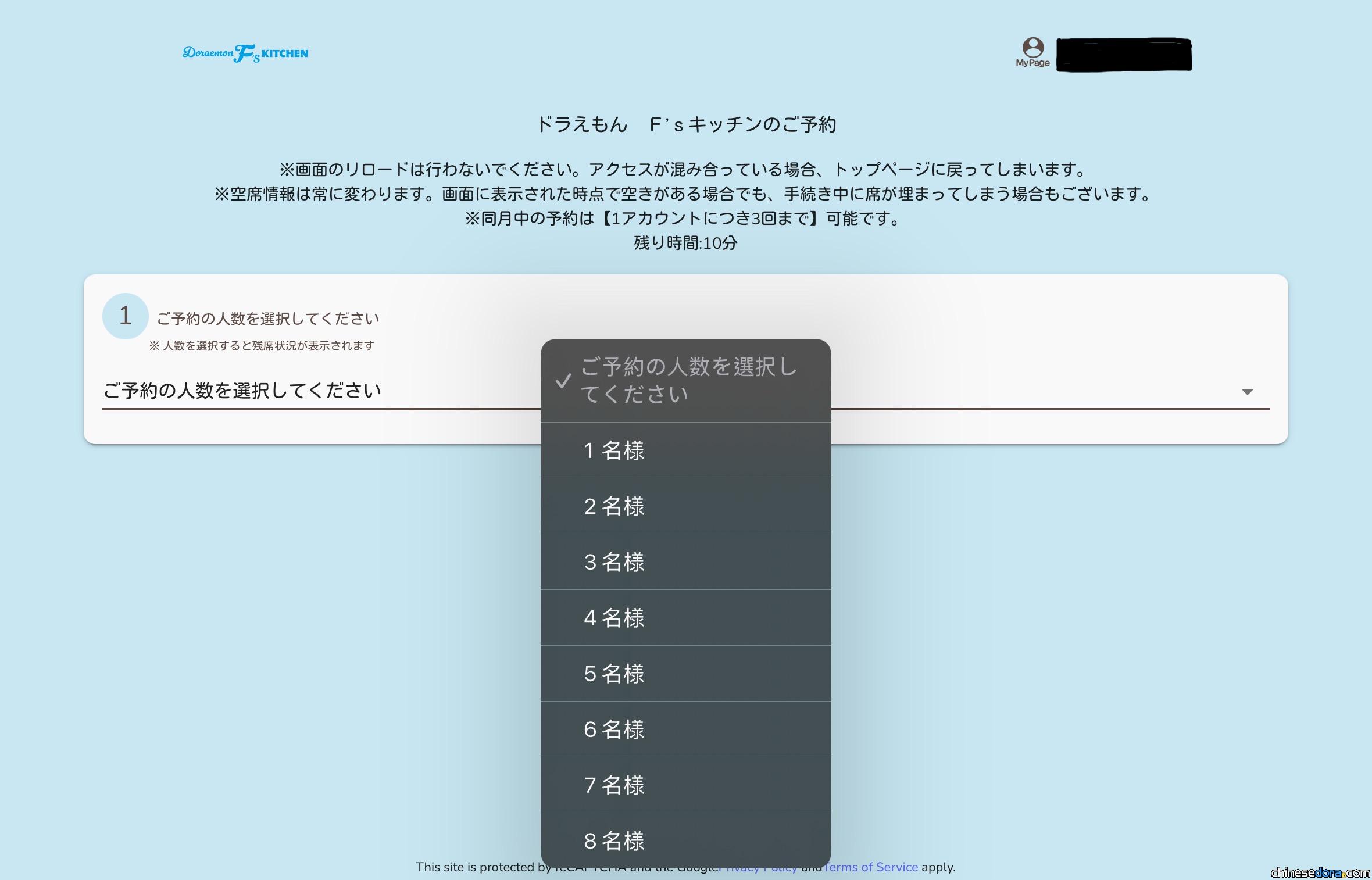
“Select Number of Guests” window of the “Doraemon F’s Kitchen” reservation system, where users choose the number of people for the reservation.(dora-fskitchen.com)
.A circle “〇” means the slot is available.
.A cross “✕” means the slot is fully booked.
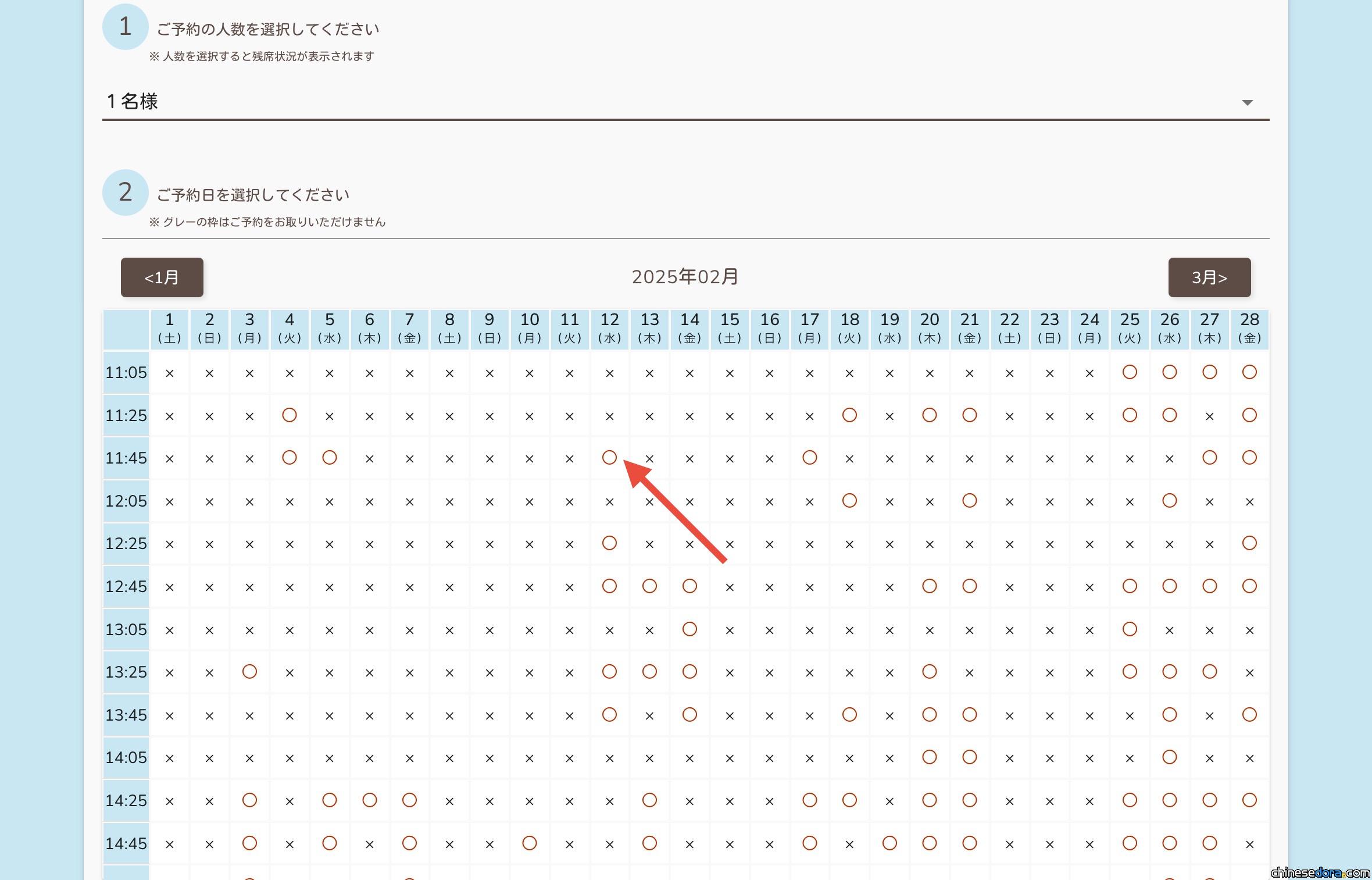 “Select Reservation Date” window of the “Doraemon F’s Kitchen” reservation system, where users choose the desired date and time.(dora-fskitchen.com)
Click on any desired and available slot (〇) to bring up the reservation confirmation window. Before completing the reservation, make sure to check all details, including your personal account information and booking details. If all the information entered is correct, click “Confirm Input”(入力内容を確認) to finalise your reservation.
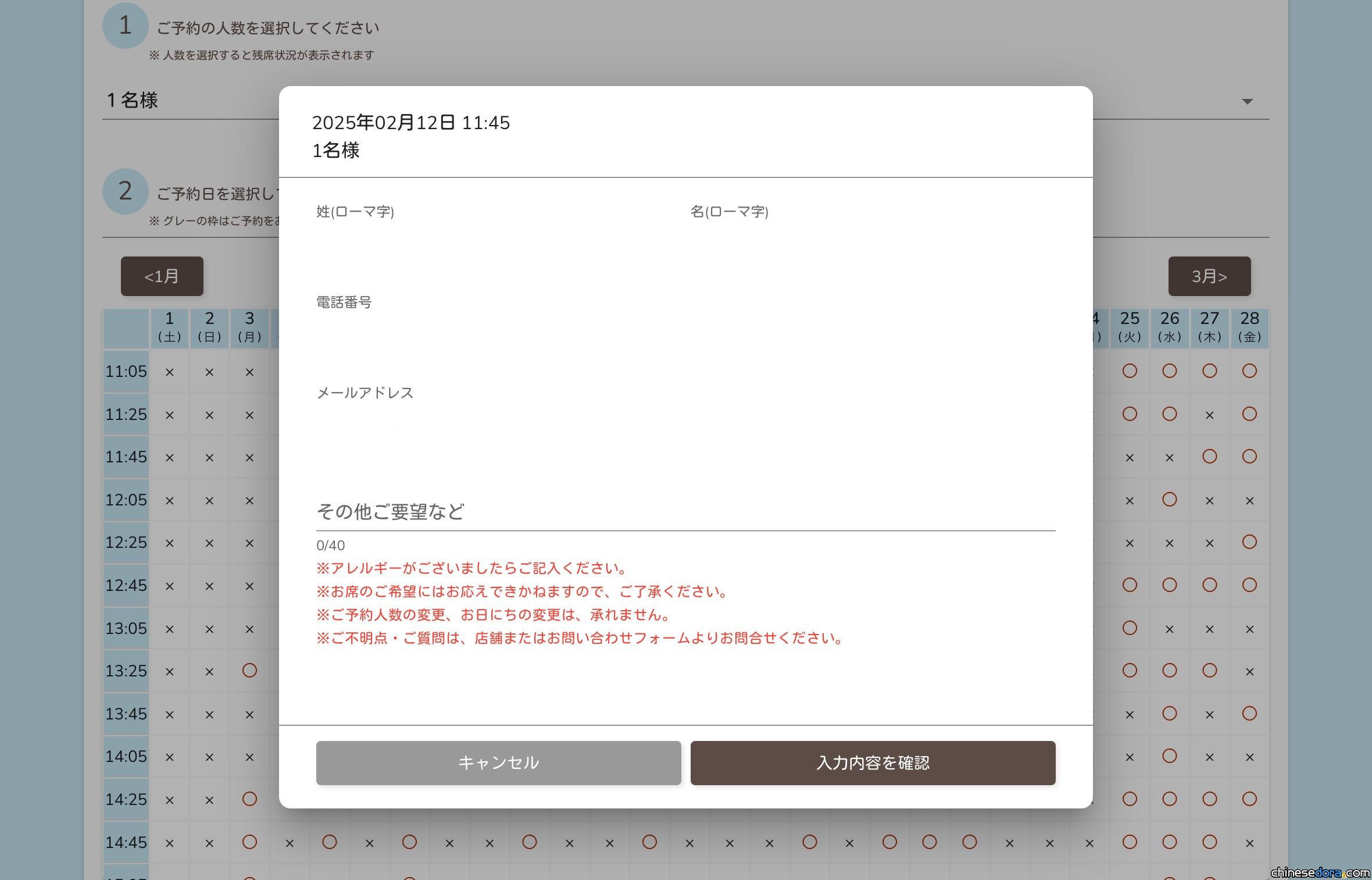 Reservation confirmation window of the “Doraemon F’s Kitchen” reservation system. Once all details are verified, the reservation is completed.(dora-fskitchen.com)
After completing the process, a confirmation email with your reservation details will be sent to you. If you need to make any modifications or cancel the booking, simply log back into the system and adjust your booking.
延伸閱讀[日本] 哆啦A夢主題咖啡廳「Doraemon F’s Kitchen」開幕!現場實景搶先看
延伸閱讀[日本] 哆啦A夢等F角色歡迎你的光臨~「Doraemon F’s Kitchen」即將開業
延伸閱讀[日本] 與哆啦A夢一起體驗藤子主題菜餚!「Doraemon F’s Kitchen」澀谷限定開業
.Location: 2F, Miyashita Park, Shibuya, Tokyo, Japan
(Address: 6 Chome-20-10 Jingumae, Shibuya, Tokyo 150-0001, Japan)
.Opening Hours: 11:00 a.m. – 9:00 p.m.
.Event Period:2024.12.12-2026.01.18
.Doraemon F’s Kitchen Reservation website
![[大陸] X11 SPACE推出《哆啦A夢》「我的伙伴系列」可動毛絨盲盒 六大角色萌趣登場](https://chinesedora.com/news/wp-content/uploads/2026/09/X11-SPACE-doraemon-toy-1.jpg "[大陸] X11 SPACE推出《哆啦A夢》「我的伙伴系列」可動毛絨盲盒 六大角色萌趣登場")
![[台灣] 華視首播哆啦A夢生日特別篇〈天空城的祕寶〉 9/3兩時段一天看畢完整故事](https://chinesedora.com/news/wp-content/uploads/2026/09/cts-newdoraemon-ep1475-4.jpg?v=1788372315 "[台灣] 華視首播哆啦A夢生日特別篇〈天空城的祕寶〉 9/3兩時段一天看畢完整故事")
![[日本] TOKYO DREAM PARK 入口螢幕新片段 「100% DORAEMON & FRIENDS」滿滿哆啦慶生及生日特別篇宣傳](https://chinesedora.com/news/wp-content/uploads/2026/09/doraemon100-tokyo-ad-ents-birth-1.jpg "[日本] TOKYO DREAM PARK 入口螢幕新片段 「100% DORAEMON & FRIENDS」滿滿哆啦慶生及生日特別篇宣傳")
![[日本] 哆啦A夢主題裝飾牆在成田機場亮相!與朋友們一起到天空大冒險](https://chinesedora.com/news/wp-content/uploads/2026/09/narita-airport.avif "[日本] 哆啦A夢主題裝飾牆在成田機場亮相!與朋友們一起到天空大冒險")